Key takeaways
- Gains App is a free UK budgeting and cashback app from the Up The Gains team. There’s no interest-bearing savings pot and no round-ups, it’s not that kind of app.
- Cashback works through digital gift cards bought via Open Banking. It’s credited instantly, and you can put it towards another gift card at any time with no minimum, or withdraw it to your bank once your balance hits £10.
- Verified rates range from 2% at supermarkets like Asda, Morrisons and Iceland up to 9% at Starbucks. Gains’ own headline claims (7% average cashback, £1,091 a year) are the company’s modelled marketing figures, not a measured average outcome. The most any single user has actually earned so far is £239, and the app has only been live for four months (as of September 2026).
- There’s no single public referral code. Every Gains user gets a personal invite link, and you both earn £2 once your friend redeems £10 in cashback, with a further £5 to you if they take out Gains Pro and stay subscribed for 30 days.
- Gains is a registered agent of RiskSave Technologies Ltd under the FCA (FRN 775330), and TrueLayer handles the Open Banking connection on a read-only basis. Gains never sees your bank login and can’t move your money.
- Your bank balance keeps its normal FSCS protection. Your Gains cashback balance and any unused gift cards do not carry FSCS protection.
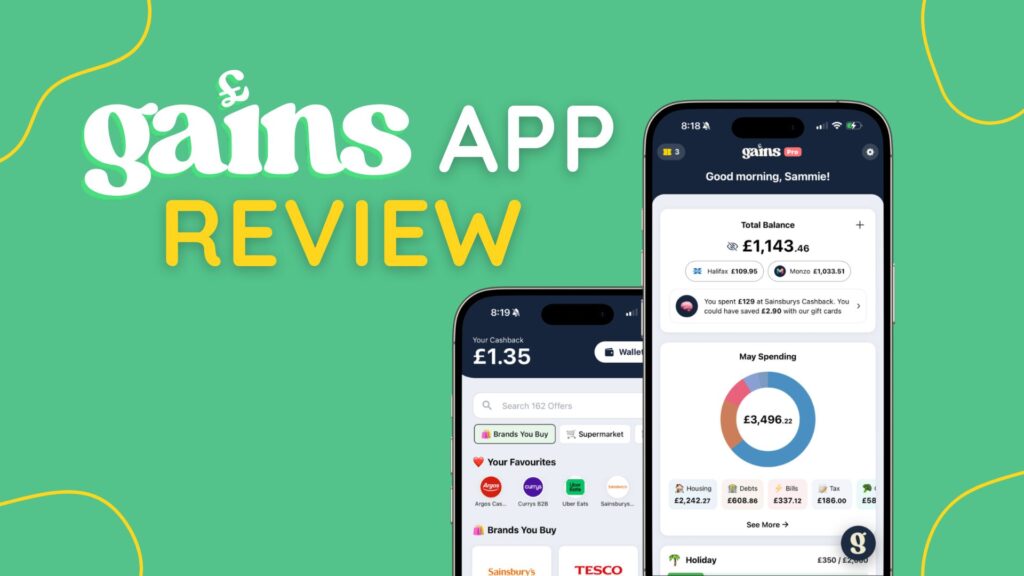
Gains App is a UK budgeting and cashback app that combines money management and rewards in one place.
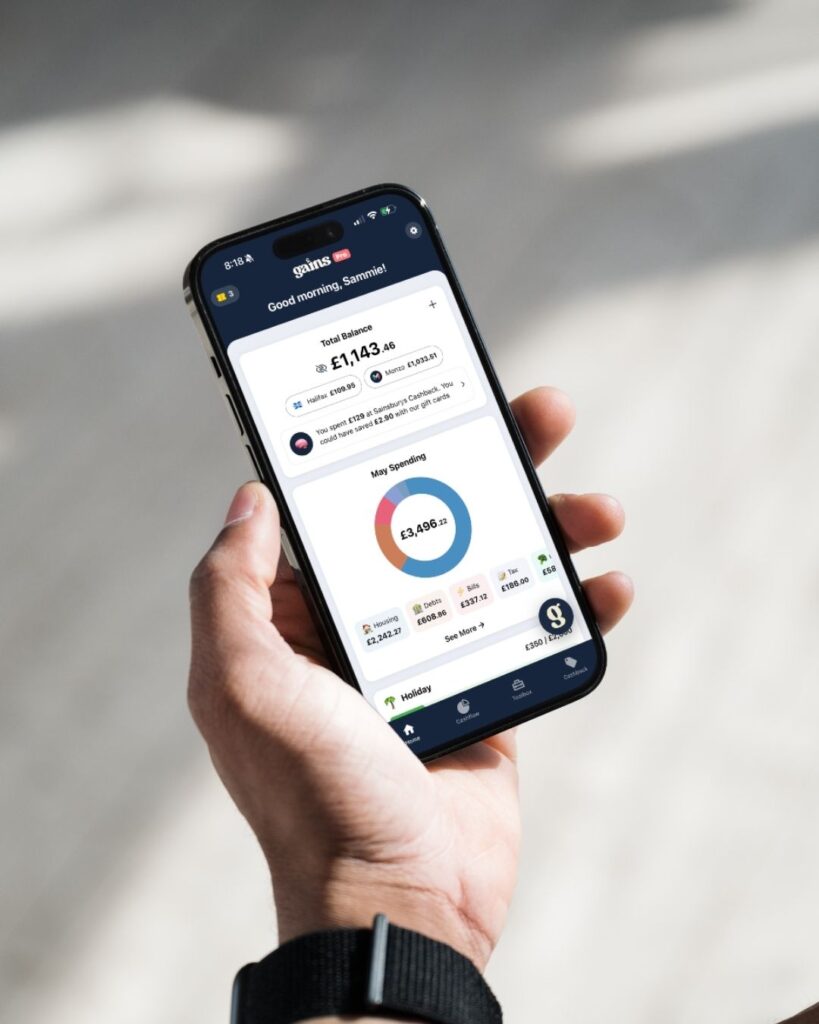
It uses Open Banking to connect to your bank accounts, track spending and suggest savings.
It also highlights personalised cashback offers on your everyday spending.
Most apps do budgeting or cashback; Gains does both.
(Disclosure: Gains App is built by the Up The Gains team. Read more about this relationship.)
| Price | Free to use, with optional Gains Pro from £5.99/month or £49.99/year (save 30%) |
| Platforms | iOS and Android |
| Cashback | Instant gift card cashback at 160+ partner retailers |
| Bank connection | Open banking, works with most major UK banks, building societies, and credit card providers |
| Best for | People who want budgeting and cashback in one app |
| Our rating | 4.5 / 5 |
Full disclosure: I am one of the co-founders, so this review is written from the inside and I have tried to be harder on it, not easier.
Sammie, Jamie and I spotted a gap in the market for a personal finance app that doesn’t just help you save money, it helps you make more of it.
That’s the gap Gains App was built to fill: helping people in the UK take back control of their money and earn more on their everyday spending.
There are plenty of budgeting apps out there, and plenty of cashback apps, but there wasn’t anything that combined the two in a way that is simple and easy to use.
Most budgeting apps are just glorified spreadsheets and make managing your money feel more like homework than something helpful.
And cashback apps love to show you hundreds of offers you’ll never use, instead of personalising them to show you the brands you use every day.


Table of Contents
Gains App brings you AI-powered budgeting tools plus cashback rewards all in one place.
No more juggling apps - manage your money and earn more of it with Gains.
Personalised cashback offers help you get more for your money without changing your spending habits.
- Free to use
- Personalised offers
- Instant giftcard cashback
- Overview of all your spending
- AI assistant for money questions
- Secure connection to 60+ UK banks
- Budgeting and rewards in one place
- No affiliate cashback
- No bill switching (yet)
- No direct savings accounts

Gains App features
- AI chat assistant – Get instant answers to your money questions
- Personalised cashback offers – Save money on your everyday spending in-store and online at 160+ of your favourite retailers
- Budgeting tools – Stay on top of your monthly spending with spending overviews and category budgets
- Savings goals – Keep track of your savings with custom savings goals
- Bill and subscription tracking – Know exactly when your recurring payments are going out and spot any unnecessary spending
- Weekly and monthly spending summaries – Know exactly where your money goes every week and month
- Gamify your spending habits – Level up your financial life with onboarding rewards to help you get more from your money.
- Custom categories – Set custom budget and spending categories that match your life with Gains App Pro
Gains Rating
- Suitable For Beginners
- User Experience
- Price / Fees
- Useful Features
- Customer Service
- Customer Feedback
I’ve rated Gains a 4.5 out of 5 using our six-pillar method which I use to assess financial apps.
Gains scored best on its suitability for beginners and user experience.
Customer feedback carries the least weight of the six pillars, simply because Gains only launched in spring 2026, so the review count is still building. It currently sits at 4.9 on the App Store, 4.6 on Trustpilot and 4.2 on Google Play.
How much cashback does Gains App pay?
Gains App cashback works differently to a browser extension or card-linked app. You don’t earn cashback just by shopping normally, you earn it by buying a digital gift card through Gains first, then spending that gift card at the till or online instead of your usual card.
Here’s the retailer-by-retailer breakdown, checked July 2026 against Gains’ own published rates. Rates are set per retailer by Gains and confirmed again in the app at the point of purchase, so always check the live rate before you buy.
Gains App cashback rates by retailer (checked July 2026)
| Retailer | Cashback rate | Notes |
|---|---|---|
| Asda | 2% | Supermarket |
| Morrisons | 2% | Supermarket |
| Iceland | 2% | Supermarket |
| Sainsbury's | 2.25% | Supermarket |
| M&S | 2.5% | Supermarket |
| Tesco | 3% | Supermarket |
| Boots | 3% | Health & beauty |
| Argos | 3.25% | General retail |
| Just Eat | 4% | Food delivery |
| Currys | 5% | Electricals |
| New Look | 8% | Fashion |
| Costa Coffee | 8% | Food & drink |
| Starbucks | 9% | Food & drink |
Gains also publishes a headline claim of earning “on average 7%* cashback on your everyday spending”, and a modelled figure of “£1,091* a year back in your pocket” based on ONS household spending data. Both of these are Gains’ own marketing calculations, not an audited average of what real users actually earn, so treat them as an illustrative ceiling rather than a guarantee.
How the gift-card cashback mechanic actually works
- Browse the offers inside the Gains app and pick a retailer you already shop at.
- Buy a digital gift card for that retailer, paid for directly from your bank account via Open Banking (this is a real payment, not a top-up to a separate wallet).
- Cashback lands in your Gains balance instantly, no waiting weeks for a merchant to “confirm” the transaction like with click-through cashback sites.
- You can put your Gains balance towards another gift card purchase at any time, there’s no minimum threshold for this.
- If you’d rather withdraw to your bank account instead, you can do that by BACS transfer once your balance hits £10. You can only make one withdrawal every 24 hours.
- A small 20p withdrawal fee applies on bank transfers, which covers banking charges. No fee applies if you put your cashback towards a gift card instead.
Worked example
Say you spend £40 a week at Tesco on your food shop. Buy a Tesco digital gift card through Gains each week instead of paying by card, and at 3% cashback that’s £1.20 back a week, which works out to roughly £62.40 across a year on that shop alone.
Add in a weekly coffee habit, say £4 a week at Starbucks, and at 9% cashback that’s 36p a week, or about £18.70 a year.
Neither number is huge on its own. The point is it’s cashback on spending you were doing anyway, credited instantly rather than sitting in a “pending” state for weeks like most cashback sites.
If you want to stack that with genuinely new income rather than just spending less, see our guide to side income ideas.
For a real-world yardstick rather than a modelled one: the most any single Gains user has earned in cashback so far is £239, and the app has only been live for four months (figure from Gains, September 2026). Your own number depends on how much of your spending goes through partner retailers, which is what the calculator below is for.
How much cashback could you earn? Try the calculator
Cashback calculator
See how much cashback you could earn on your everyday spending.
Groceries, toiletries and the weekly shop.
If you shop in bursts, average it out over the year.
Eating out, coffees, cinema and days out.
Furniture, homeware and anything for the house.
Hotels, trains and taxis for the year.
This uses the same category rate assumptions as Gains’ own calculator (4% food, 7% clothing, 9% social, 6.5% household, 4% travel), so it is an estimate, not a promise. Real rates vary by retailer, from 2% at the big supermarkets to 9% at Starbucks in our September 2026 check. Confirm the live rate in the app before you buy a gift card.
What are the pros and cons of Gains App?
Pros
- Free to use base app features
- Instant giftcard cashback
- Personalised offers
- AI assistant for money questions
- Overview of your spending
- Secure connection to most major UK banks
- Budgeting and rewards in one place
Cons
- No direct savings accounts
- No bill switching
- No affiliate cashback
- iOS & Android only - no web or desktop app
- New app with short track record
- More substantial budgeting features on Pro tier
Is Gains App good for beginners?
Yes, Gains is good for beginners. Especially those that struggle to budget and find visual aids useful.
The fact that it connects with your banks within minutes and has a really easy to use interface makes it a very attractive option.
However, if you’re looking for a wider suite of features such as saving and investing then apps like Plum and Chip could be better solutions.
You can also check out our full list of UK budgeting apps here.
Who is behind Gains?
Gains App is built by the Up The Gains team: Sammie Ellard-King, founder of Up The Gains, with co-founders Jamie Dunmore and me, Chris Barnes, the author of this review.
We built it because so many people struggle to get a handle on their money. In Up The Gains’ own Money Confidence Report 2026, a survey of 1,679 UK adults, only 31% said they feel fully in control of their weekly finances, and 83% said they feel anxious about money at least sometimes.
Sammie explains the gap he kept running into before Gains existed:
“I’ve tried Snoop, I’ve tried Emma, I’ve tried multiple cashback apps, I’ve tried manually tracking in those spreadsheets, I’ve evolved that spreadsheet, and it still required such a lot of effort.” [04:02]
“I just wanted something that would bring it all together. And I kept thinking, basically, well, why doesn’t this just exist?” [04:49]
You can hear the full story on episode 186 of the podcast.
Gains combines three things rarely found together in one app: comprehensive budgeting tools, personalised cashback rewards, and gamified financial goal tracking, all powered by an AI assistant you can chat with about your money.
How does Gains work?
Before the step-by-step, here is the app in use. Sammie walks through Gains from 1:45 in this video, then budgets his own salary in it. It was filmed in September 2026, so it shows the current version of the app.
1) Download app (iOS/Android)
Gains App is available on both iOS and Android.
Click a button below to download:
2) Connect bank accounts
Gains uses secure Open Banking connections via TrueLayer to obtain read-only access to your spending data.
When you first sign up to the app you’ll be asked to connect your account and then will be sent to your banking app to log in as normal.
Gains never sees or asks for your login credentials – everything is done directly through your banking app and access must be re-permitted every 90 days.
Open Banking is the secure, industry standard process used by hundreds of finance apps to securely access spending data.

3) Automatic spending analysis
As soon as your bank accounts are connected, Gains will analyse your recent spending data, categorising the transactions and getting ready to help you save money from day 1.

This will show you how much cashback you could have earned from your recent spending had you used instant cashback gift cards through Gains App’s partner retailers.
It will also show you your recurring transactions (e.g. bills and subscriptions) to show any that you might be paying for but not using.
You can then go and cancel any subscriptions you don’t want to keep.
4) Set budgets and savings goals
Next, you can go into budgeting and set your:
- Total monthly budget
- Category budgets
- Savings goals
The total monthly budget should cover all your bills, day to day spending and any other outgoings. It should be an accurate representation of what you spend, or what you want to spend, every month.
After setting the total amount you can then set individual budgets for each category such as groceries, household essentials, clothing and travel plus many more.
This does take a few minutes to set up but you can always come back to it later and change the figures if you didn’t get it right.
Budgeting is variable and everyone is different so don’t feel like you have to get it bang on first time.
Now is also the chance to set your first savings goal.
This can be as small or large as you like but pick something that will be fun and motivating to work towards like a holiday.
5) Use your personalised cashback offers
The spending analysis will have shown you the top retailers where you could have saved money based on your actual spending.
So the next thing to do is start earning cashback.
Next time you’re going to one of your favourite retailers or any of the other 160+ partner brands then make sure to buy a gift card before doing your shopping.
It’s as simple as buying a gift card, instantly earning cashback, and then using the gift card to pay for your shopping instead of your debit card or Apple Pay.
6) Track progress and build habits
As soon as you are in the app, you will have a list of tasks to complete which will help you make the most of gains and get the most out of your money.
These include:
- Setting a budget and saving goals
- Using the AI chat
- Using gift cards
You’ll be rewarded for completing all these tasks.
This is all designed to give you a quick look at all the main features inide Gains and get you used to using them.
The important thing with money management and cashback rewards is consistency.
A few pounds in cashback from your shopping isn’t going to make much of an impact.
But making sure you get your cashback every time you shop is when it becomes hundreds of pounds a year for hardly any effort.
That’s why Gains has inbuilt streaks and bonuses to help you build the habit.
7) Chat with AI for insights.
Gains AI assistant is always there for your money questions, giving you instant answers so you don’t have to search through your transactions or different screens in the app.
You just simply type, “How much did I spend on takeaways last month?” and Gains will instantly tell you.
It will also tell you if there are ways that you could have been saving money through cashback offers and link you straight to the gift cards if you need to purchase one.
Is Gains App legit and safe?
Yes, Gains App is legit and safe to use, and it’s easy to verify independently rather than just taking our word for it.
Gains App is run by Gains Money App Ltd, Companies House number 16565380, a UK-registered private limited company. You can look the company up yourself on the Companies House register at any time.
Gains Money App Ltd is a registered agent of RiskSave Technologies Ltd under the Payment Services Regulations 2017. RiskSave is authorised and regulated by the Financial Conduct Authority under FRN 775330, and you can check that status yourself on the FCA register. The actual bank connection runs through TrueLayer, an FCA-regulated Open Banking provider, a separate role to Gains’ own regulatory status above.
Open Banking is a secure way to share your financial data with authorised apps.
Gains never holds your money.
Unlike a savings or investment app, Gains does not store your cash or move it anywhere. It connects to your accounts through open banking on a read-only basis, so it can see your transactions to give you budgeting insights and cashback offers. But it cannot move, spend, or withdraw a penny.
Sammie puts it plainly:
“It’s regulated by the FCA. So we have FCA agent status on Gains App. And what it is, it’s read-only access to your transactions. It can never move money, can’t access your accounts, it can’t do anything at all.” [13:01]
That FCA status runs through RiskSave Technologies Ltd, FRN 775330, the regulated entity Gains operates under.
Gains never sees or asks for your banking login details. Everything happens directly through your own banking app.
Your money stays exactly where it is, in your own bank account, with the same FSCS protection as any UK bank.
That protection does not extend to your Gains balance itself. Your cashback balance and any unused gift cards sit outside the FSCS scheme. They’re not currently covered by any published safeguarding or e-money protection statement.
In practice this means: don’t let a large cashback balance sit unwithdrawn for longer than you need to. Treat gift cards the same way you’d treat any retailer gift card.
On the data side, Gains uses bank-level encryption to protect your information, and the open banking connection itself is regulated by the FCA. You can disconnect any account at any time from inside the app.
What banks does Gains connect with?
Gains connects with most major UK banks, building societies and credit card providers via Open Banking, which Gains says covers around 99% of UK banks.
That includes Barclays, NatWest, Lloyds, HSBC, Santander, Monzo, Starling, Revolut, Nationwide, Halifax, Bank of Scotland, TSB, First Direct, Co-operative Bank, Chase UK, Virgin Money, Metro Bank, Tesco Bank, Sainsbury’s Bank, M&S Bank, Capital One and MBNA, plus credit card providers like American Express and Barclaycard.
The full compatible bank list is confirmed inside the app when you connect, since Open Banking coverage changes from time to time.
Connecting all your banks and cards is helpful to make full use of the Gains app.
This way, Gains can start to look at your spending and allow you to get a complete financial picture.
Is there a Gains App referral code?
No, there isn’t a single public Gains App referral code you can search for and copy. Every Gains user gets their own personal invite link inside the app instead, and that link is how the referral scheme actually works.
If you’ve seen someone online sharing a “Gains referral code”, that’s their own personal invite link, not an official universal one. You’ll get the same reward going through Gains’ own mechanics, which we’ve broken down below.
How the Gains referral programme pays out, step by step:
- Open the Gains app and find the invite or referral section in the menu.
- Share your personal invite link with a friend, whether that’s by text, WhatsApp, email or social media. There’s no code to remember or type in.
- Your friend downloads Gains, signs up (they need to be a UK resident aged 18 or over) and connects their bank account through Open Banking.
- You both earn £2 once your friend redeems £10 in cashback through the app.
- There’s a further bonus on top: you earn an extra £5 if your friend takes out a Gains Pro subscription and stays subscribed for 30 days.
- Handy to know: £10 is also the threshold for withdrawing cashback to a bank account, but earned cashback can be put towards a gift card purchase at any time with no minimum.
- You’re limited to one referral bonus per person, and if you don’t redeem it, it expires 12 months after it’s granted.
- Referral rewards are only available to verified UK users aged 18 and over, and self-referral or fraudulent sign-ups aren’t allowed.
Because the £2 only unlocks once your friend has redeemed £10 in cashback, rather than just downloading the app, it’s worth telling them to start buying their gift cards through Gains straightaway so the bonus lands for both of you sooner. The extra £5 is worth mentioning too, since it rewards you for a friend who genuinely sticks with the app rather than a one-off sign-up.
What makes Gains App different?
There are lots of budgeting and cashback apps out there.
So what really sets Gains apart?
AI chat assistant for money questions
Budgeting with spreadsheets is slow, complicated, boring, and time-consuming, and puts most people off from doing it.
Budgeting apps are an improvement from that with easier-to-read dashboards, graphs, and charts, but they don’t solve the real problem.
Which is getting answers to the questions that you have immediately with a spreadsheet or app dashboard.
If you have a question like, “How much did I spend on groceries last month?” You still have to go through and either search all the individual transactions and add them up or find the right screen in the app to get the answer.
With AI in Gains, it’s as easy as asking the question and getting an instant answer back.
None of the other budgeting apps we compare on this page offer that kind of instant AI chat, which makes taking control of your money easier.
Personalised cashback offers
With most cash back platforms, they show you generic offers that are mostly tailored to how popular they are or how much incentive there is for the platform to show you them.
With Gains, cash back offers are personalised to you based on your individual spending.
Gains will see which retailers you shop at the most, work out how much you could save, and show you the offers that you’re most likely to need when you need them.
This is especially useful around birthdays, which are predictable but easy to lose track of across a year. If you want a sense of what’s normal to spend before you buy, see my full birthday present cost breakdown by relationship, then let Gains App’s cashback offers claw a bit of it back automatically.
Spending categorisation and insights
Budgeting used to mean getting all your transactions from your bank, writing them down, and manually categorising all of them or inputting them into a spreadsheet or app one by one.
This could take hours to go back even just a couple of months, let alone a full year, and would be multiple hours per month to keep on top of.
With Gains, every transaction is automatically categorised into and has custom categories that you can set up for your own personal spending, such as hobbies and savings goals.
Spending insights show whether you’re on track for your overall budget and individual categories, highlighting if you’re likely to overspend in a certain category this month based on where you’re up to. This can help you keep on track throughout the month. You can also re-categorise any incorrect transactions.
Subscription tracking
We live in a world where everything seems to need a subscription these days, from the gym to TV to coffee to music.
It can be hard to keep on top of all the different payments and when they’re due to come out.
Add on bills, insurance, and it can get out of hand fast. Knowing what you’re paying out and when is key.
Gains identifies recurring transactions, shows us when they’re going to be paid and helps you keep on top of anything you might need to cancel.
Is Gains Pro worth it?
Gains has a very generous free plan with all essential budgeting features, cashback rewards and AI analysis available at no cost.
However, there is a paid Gains Pro subscription for more extensive features if you really want to make the most of your money.
Pro is worth a look if you have more than one bank account to connect, want 12 months of spending history rather than two, or want the net worth tracker and money health score. Whether the boosted cashback rates alone cover the £49.99 a year depends on how much of your spending runs through partner retailers, so it is worth running your own numbers through the calculator higher up this page.
| Feature | Gains (Free) | Gains Pro |
|---|---|---|
| Monthly cost | Free | £5.99/month or £49.99/year (save 30%) |
| Bank connections | 1 | 6 |
| Spending history | 2 months | 12 months |
| AI chat assistant | Limited | Unlimited |
| Instant gift card cashback | ✓ Yes | ✓ Yes (boosted rates on Pro) |
| Set monthly spending budgets | ✓ Yes | ✓ Yes |
| Automatic spending categorisation | ✓ Yes | ✓ Yes |
| Bill and subscription tracking | ✓ Yes | ✓ Yes |
| View spending by retailer or category | ✓ Yes | ✓ Yes |
| Upcoming bill planner | ✓ Yes | ✓ Yes |
| Custom spending categories | 1 | 8 |
| Savings goals | 1 | 5 |
| Joint account feature | ✗ No | ✗ No |
| Boosted cashback rates | ✗ No | ✓ Yes |
| Net worth tracker | ✗ No | ✓ Yes |
| Money health score | ✗ No | ✓ Yes |
| Cashback streaks (extra cashback boost for hitting a four-week streak) | ✓ Yes | ✓ Yes |
User experience - what is Gains like to use?
Gains is a fast, easy-to-use app.
All the important features are front and centre, nothing is hidden behind multiple menus, which is something seen in apps like Emma.
It’s got a modern, colourful and clean user interface which makes it feel calm and relaxing to use.
There are no big red numbers judging you.
It’s a big step forward from outdated budgeting app interfaces, while also being simple to use, unlike some, like YNAB, which have a steep learning curve.
Having the chat interface just speeds up everything.
You want to simply ask a question to get an answer, and then if you need to move to another screen, the app the chat can send you straight there for updating your budget or buying an instant cashback gift card.
It’s extremely intuitive and feels very similar to using many of our day-to-day, frequently used apps, rather than having to go to the trouble of learning something completely new.
Gains is perfect for people who find traditional finance apps and budgeting spreadsheets overwhelming.
Because the AI can answer your money questions instantly without having to search through tons of different screens or lists of transactions, it’s so easy just to open to quickly to find the information you need.
Gains App user reviews and feedback
Gains launched to the public in spring 2026, and the live reviews are strong for a young app.
As of mid-September 2026 it holds 4.9 on the App Store from 154 ratings, 4.6 on Trustpilot from 31 reviews (87% five-star), and 4.2 on Google Play from 28 reviews, with over 5,000 downloads there.
Reviewers on Trustpilot repeatedly mention finally seeing where their money actually goes once their accounts are linked, and how quick the cashback tab is to use at the checkout.
One reviewer said the cashback they had earned already covered the cost of their Gains Pro subscription. Several others praise how responsive the support team is.
A few reviewers, students especially, would like to see the £10 minimum lowered.
Gains only launched in spring 2026, so the review pool is still small next to apps that have been around for years, and it will keep growing from here.
Gains alternatives - how it compares to the competition
Gains vs Emma
Both are comprehensive budgeting apps with cashback features, although Emma’s cashback is affiliate rather than gift card cashback. That means less usability for everyday spending, and much longer waiting times to get your money, often months instead of instant.
Emma also hides cashback behind a paid plan, whereas Gains offers full access to instant gift card cashback for free.
Emma launched in 2018 and has a longer track record, which gives it stability and an element of trust. Emma has its own gamification too (Quests, streaks and badges) and offers investing on its paid tiers, so the real difference is the cashback: instant and free in Gains, affiliate-based and paid-for in Emma.
Emma fits better if you want a long-established app with credit monitoring. Gains fits better if you want more engaging budgeting with easier cashback access.
Emma pros: longer track record since 2018, credit monitoring, investing on its paid tiers, its own quests and streaks. Emma cons: cashback is affiliate-based with waits of months rather than instant, sits behind a paid plan, and there is no AI chat assistant.
Gains vs Plum
Plum specialises in automatic savings, using its Plum Brain to calculate safe-to-save amounts, plus investment options through ISAs, General Investment Accounts, and Self-Invested Personal Pensions.
Plum also added its own AI assistant in 2026 and can switch your energy or broadband for you. Gains focuses on budgeting with cashback. It does not offer direct savings or investment accounts, but does offer ways to get more from your money through savings goals and cashback rewards.
Plum fits better if your priority is automated saving and investing. Gains fits better if budgeting and cashback matter more to you than investing.
Plum pros: automatic saving via Plum Brain, ISA, GIA and SIPP investing, its own AI assistant, energy and broadband switching. Plum cons: no cashback on your spending, no budgeting-plus-cashback combination, and its paid tiers are monthly only.
You can read our full Plum review by clicking here.
Gains vs Snoop
Both apps have comprehensive budgeting tools, but their additional features are where the differences lie. Snoop focuses heavily on bill switching, finding users the best deals on utilities, insurance and broadband.
Gains focuses on everyday money saving, using instant gift card cashback to save users money on everyday spending at supermarkets, household essentials, clothes shops and more.
Snoop fits better if reducing fixed bills is your priority. Gains fits better if everyday spending management and cashback rewards appeal more.
Snoop pros: strong bill-switching tool for utilities, insurance and broadband. Snoop cons: no instant gift card cashback of the kind Gains offers.
You can read our full detailed Snoop review by clicking here.
Gains vs YNAB
You Need A Budget (YNAB) offers comprehensive envelope budgeting features but has a steep learning curve.
It’s a predominantly US-focused app, requiring currency conversions and manual UK bank connections for most users. Gains is UK-native, with automatic Open Banking connections at all the major UK banks, automatic transaction categorisation and straightforward budgeting.
YNAB fits better if you want the most rigorous budgeting method and don’t mind the price or complexity. Gains fits better if you want easier UK-specific budgeting at a lower cost, with AI and cashback features.
YNAB pros: comprehensive envelope budgeting method. YNAB cons: steep learning curve, US-focused, requires currency conversion and manual UK bank connections.
Gains vs Other Budgeting Apps Summary
Of the apps compared on this page, Gains is worth considering if you want budgeting tools, savings goals and bill tracking alongside cashback rewards, with the core features staying free.
| Feature | Gains | Emma | Plum | Snoop | YNAB |
|---|---|---|---|---|---|
| Price of paid tier | Free (Pro £49.99/yr) | From £41.99/yr | From £3.99/mo, monthly only | £47.99/yr | $109/yr (USD) |
| Cashback | ✓ Yes, free | ✓ Yes, paid tiers | ✗ No | ✗ No | ✗ No |
| AI chat assistant | ✓ Yes | ✗ No | ✓ Yes | ✗ No | ✗ No |
| Investments | ✗ No | ✓ Yes, paid tiers | ✓ Yes | ✗ No | ✗ No |
| Bill switching | ✗ Not yet | ✗ No | ✓ Yes | ✓ Yes | ✗ No |
| Gamification | ✓ Yes | ✓ Yes | Limited | ✗ No | ✗ No |
Prices and features checked against each provider’s own site in September 2026. Emma has three paid tiers (Plus, Pro and Ultimate), Plum has three monthly-only tiers, and YNAB charges in US dollars.
Gains vs Other Cashback Apps Summary
Of the budgeting apps we have tested, Gains is the only one that pairs instant, personalised cashback rewards with proper budgeting tools and an AI financial coach.
Most cashback apps only show generic offers which are the same for everyone and not tailored to your spending.
Often these are boosted offers designed to encourage impulse spending rather than saving money on what you’re already buying.
You can see how Gains stacks up against every other option in my guide to the best cashback apps in the UK.
If you want to see how cashback works across every method in the UK, not just apps, check out our complete UK cashback guide.
Who should use Gains?
Best for these users:
- Budgeting beginners who find traditional apps overwhelming – Gains’ gamification reduces intimidation
- Students and young adults seeking affordable money management with cashback perks
- People with budgeting fatigue who’ve tried spreadsheets or YNAB and quit – engagement features help consistency
- UK-focused users wanting Open Banking integration without US app limitations
- Cashback enthusiasts who want rewards integrated with budgeting rather than separate apps
- Multi-account jugglers needing one dashboard for current accounts, savings, credit cards
Not ideal for:
- Advanced investors needing ISA/SIPP/pension integration (use Plum/Emma instead)
- Users wanting bill comparison and switching (Snoop is better)
- People requiring a rigorous envelope budgeting methodology (YNAB is better)
- Those preferring manual entry for “mindful” budgeting
If you want to see how Gains compares against the full field, check our round-up of the best money saving apps in the UK.
Frequently Asked Questions
Gains App is a free UK app that combines budgeting and cashback in one place. It connects to your bank via Open Banking, tracks your spending, and lets you earn instant cashback by buying digital gift cards at 160+ retailers instead of paying by card.
Yes. Gains App is run by Gains Money App Ltd (Companies House no. 16565380), a registered agent of RiskSave Technologies Ltd under the FCA (FRN 775330). Its Open Banking connection runs through TrueLayer, is read-only, and Gains never sees your bank login details.
No, there’s no single public referral code. Every Gains user gets a personal invite link inside the app instead. You both earn £2 once your friend redeems £10 in cashback, plus a further £5 to you if they take out Gains Pro and stay subscribed for 30 days.
You buy a digital gift card for a retailer through Gains, paid via Open Banking, and cashback lands in your Gains balance instantly. Spend the gift card in-store or online, put your balance towards another gift card any time, or withdraw by bank transfer once it hits £10.
It depends on where you shop. Verified rates range from 2% at supermarkets like Asda, Morrisons and Iceland up to 9% at Starbucks, with most retailers falling between 2% and 8%. Gains’ own modelled estimate is £1,091 a year, though that’s a marketing figure, not a guaranteed outcome.
Yes, the core app is free: bank connection, budgeting, cashback and the AI chat assistant all cost nothing. Gains Pro costs £5.99 a month or £49.99 a year (a 30% saving), and adds 6 bank connections, 12 months of spending history, unlimited AI chat, 8 custom categories and 5 savings goals.
Gains has 160+ partner retailers, including Tesco, Sainsbury’s, Asda, Morrisons, M&S, Boots, Argos, Currys, New Look, Costa, Starbucks, Just Eat, ASOS and JD Sports. Verified rates range from 2% to 9% depending on the retailer, confirmed in the app before you buy a gift card.
Gains App is built by Gains Money App Ltd, founded by the Up The Gains team: Sammie Ellard-King, Chris Barnes and Jamie Dunmore. It’s run by the same people behind Up The Gains, the UK personal finance platform, which we disclose openly on this page.
Your bank balance keeps its normal FSCS protection, since Gains never holds or moves your cash directly. However, your Gains cashback balance and any unused gift cards are not FSCS protected, so it’s worth withdrawing or spending cashback rather than letting it build up.
Gains connects with most major UK banks, building societies, and credit card providers via Open Banking, including Barclays, NatWest, Lloyds, HSBC, Santander, Monzo, Starling and Revolut. You can check the full compatible bank list inside the app.
No. Connecting your bank accounts to Gains doesn’t involve a credit check and has no effect on your credit score. Gains only reads your transaction data to help with budgeting and cashback, it never performs any kind of credit search.
Final thoughts - is Gains worth downloading?
As you can tell from this Gains App review, we’re fans of it.
Gains is an app that not only lets you track your spending in one place, it goes a step further to help you save money on your everyday spending.
In my few months of using the app, it saved me money from cashback on everyday spending and showed me some subscriptions I’d forgotten about that I could cancel.
All in all, that’s totalled about £500 back in my pocket.
It’s hard to say that about any other budgeting app I’ve used, which is why it scores 4.5 out of 5 in the rating box above.
The half point that’s missing is the same gap as everywhere else on this page: you can’t save or invest directly inside Gains, which competitors like Chip and Plum allow you to do.
If you’d like to check out all of our favourite budgeting apps, you can do so here.
Share on social media
Disclaimer: Content on this page is for informational purposes and does not constitute financial advice. Always do your own research before making a financially related decision.
Disclaimer: Gains App is built and run by Sammie Ellard-King and other members of the Up The Gains team. While there is no direct payment for any affiliated signups, it is an affiliate-adjacent relationship.