I think Chip is a fantastic option for beginners looking to save and invest.
A four time winner of ‘Best Personal Finance App’ at the British Bank Awards (most recently in 2025), its primary selling point is to combine saving and investing all under one roof.
Saving and investing can be done automatically without having to lift a finger which is a big bonus, and new customers can currently earn a boosted 3.51% AER on the Instant Access Account (correct as of 4 August 2026).
Chip Bank Review - Main Features
I personally downloaded Chip and ran tests for 6 months to put together a comprehensive Chip savings review.
From my findings here is a list of the key features Chip offers to help you understand how does Chip work.
Here’s a summary of some of the things we found useful at Chip:
- Automated savings – Thanks to powerful AI, you don’t need to lift a finger the system can save automatically for you
- Analyse your spending – .By analysing your spending patterns with open banking and AI it knows precisely how much you can afford to save and invest each month
- Set saving goals – Set goals and then track your progress towards achieving them
- Withdrawals – Withdrawing money is easy, but can take two working days
- Earn Interest – The Chip interest accounts mean that you can earn interest on your savings
- Invest your money – By teaming up with BlackRock, Chip now allows its users the opportunity to invest in highly respectable funds worldwide
- Save every payday – Set up a function so that you automatically save every time that you reach payday
- Safety – Chip is regulated by the FCA and covered by the FSCS
Chip App Review
I’ve rated Chip 4.46 out of 5 stars which is a very respectable score here on Up the Gains.
This is using our six pillar method, which assesses useful features, customer service, user experience, fees, feedback and suitability for beginners.
Chip scored best for it’s suitability for beginners and useful features however scored slightly lower for fees and current customer feedback.
I personally think Chip is a great app to put aside an emergency fund in a high interest savings account and get yourself into investing.
When comparing it to competitor apps like Plum and Snoop it scores very well. Scoring just under Plum but higher than Snoop.
If you want to get started with Chip you can head over to their website and open an account for free.
Is Chip good for beginners?
Yes, Chip was created for beginners in mind. Chip is an ideal tool specially created for those who find it difficult to save or invest.
The app is extremely easy to use and has many features that help you manage your money.
You have the option to store your money as cash and earn interest on it if you’re not up for investing. However, it’s worth noting that investing could yield considerably more returns in the long run.
For investing newbies, it’s important to recognise that some decisions need to be made regarding how your money is allocated. We’ve provided a breakdown of these options below, but don’t fret, as it’s a fairly simple process.
Chip Pros & Cons
Who Are Chip and How Does It Work?
Before we dive into our Chip app review, let’s take a moment to look at the company itself.
Founded in late 2017 by Simon Rabin and Nick Ustinov, this fintech company now has a team of 130 people and some 500,000 + registered users.
What has made Chip so popular is that it has a mission to help people create wealth.
It wants you to save and invest just as easily as you can spend (and we all know how easy spending can be!).
Like some of the other platforms that we’ve looked at like Snoop and Plum, the Chip app makes use of artificial intelligence and Open Banking.
This allows it to analyse your spending habits and make saving something that is both affordable and automatic.
Thanks to a partnership with BlackRock (one of the biggest investment companies in the world), Chip users also have access to an array of investment products.
Chip Bank Review: Is Chip a Bank?
No, Chip is not a bank and it holds no UK banking licence. Chip is an FCA regulated money app, and the key point in this Up The Gains Chip bank review is that your cash never actually sits with Chip: the savings accounts are held by licensed UK partner banks (the Instant Access Account, for example, is held by ClearBank), so eligible deposits get full FSCS protection.
That protection has two different limits, which most reviews muddle:
- Cash savings are FSCS protected up to £120,000 per person, per bank (the deposit limit rose from £85,000 on 1 December 2025).
- Investments held in the Stocks and Shares ISA or General Investment Account are covered separately up to £85,000, and the FSCS never covers normal market falls.
- If Chip itself went bust, your savings would still sit with the partner bank rather than with Chip.
That structure makes Chip a sensible home for an emergency fund you want earning interest, even though it is not technically a bank. You can confirm any provider’s cover with the FSCS protection checker.
Chip App Review - Account Types
As we went through the sign up process there are currently two main account types that are available to users.
These are the Chip Basic account and the ChipX account.
They also have a selection of savings accounts too which we’ll touch one below but you are guided to sign up to the basic or the X accounts.
One of the major differences here comes down to the fees that are charged, but what else is there to differentiate between the two?
Chip Basic
With the Chip basic account, this is what you are given access to:
- The ability to set up auto-saving
- No limit on the number of manual deposits that you make
- The chance to set up savings goals
- Interest when you choose to put funds into a savings account
- Payday put away so that funds are taken each time that you’re paid
- Access to a general investment account
- A choice between cautious, balanced, and adventurous investment funds via BlackRock
- FSCS cover
As you can see, the Chip basic account certainly has a lot to offer, so you may be wondering what the ChipX account has.
ChipX
ChipX offers everything that the basic account covers, but it also includes:
- As well as a general investment account, there is also the chance to use a stocks and shares ISA so that you can benefit from the tax advantages that an ISA brings
- There is access to other investment funds such as emerging markets and ethical funds
When it comes to the interest that can be earned on your savings, it doesn’t matter which account you have.
Personally having downloaded Chip X and used it myself I thought it was worth the upgrade simply because the stocks and shares ISA is key for me when looking at a provider like this.
It is Chip’s partnerships with licensed UK banks that allow for interest payments, and it pays a pretty good rate compared with the rest of the industry.
The interest payments can be accessed with both the Chip basic account and the ChipX account and the following four accounts although rates do vary.
Yes, there are other options and these are the:
Instant Access Account
Competitive interest rates paid monthly into your account. This account aims to beat high street banks by keeping an eye on the Bank of England’s interest rates.
This account also has access to the auto saving tools. One thing to note is withdrawals are stated as ‘almost’ instant which isn’t really instant as the account is called.
Prize Savings Account
If you have ever heard of premium bonds then this account is similar and has monthly winnings.
There is a grand prize of £10,000 and lots of smaller cash prizes each month. Every £10 saved in this account is x1 entry. Chip says you’re x4 more likely to win than premium bonds.
I think this is a good idea and certainly something to explore if you’re into premium bonds already.
90-Notice Savings Account
Now this account is a great idea for those who really struggle to save anything at all. Any money you put inside to withdraw you have to give 90 days notice.
Whilst this may seem extreme personally this is a game changer and should be used by savers that struggle for things like Christmas presents.
Easy Access Savings Account
We’re not too sure what the point of this account is other than instant withdrawals. The interest rate is a lot lower than the instant access but losing that interest for faster withdrawals is a bit extreme.
Chip Account Review: What's Changed for 2026
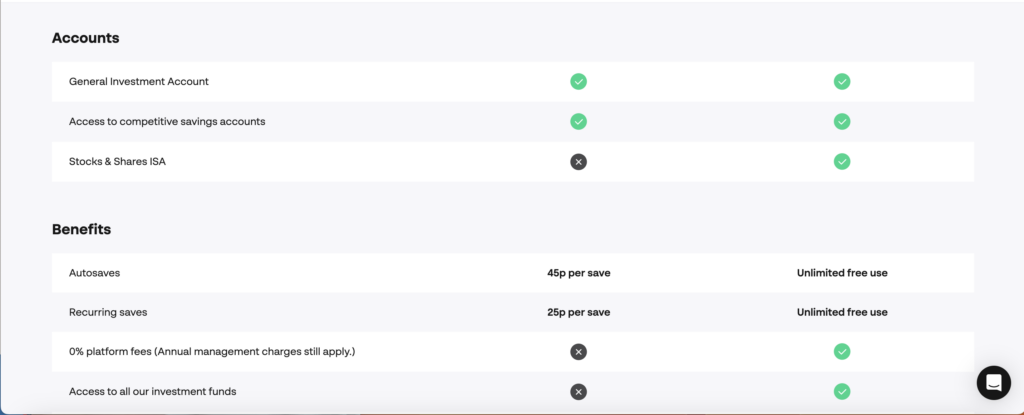
Since I first tested the app, Chip has reshaped its accounts, so here is the up to date position for this Chip account review (correct as of 4 August 2026). Chip now runs two membership plans: the free Chip plan, which now includes the Stocks and Shares ISA as well as the General Investment Account, and ChipX at £5.99 every 28 days (£65.05 paid annually) with a 28 day free trial.
- Free plan: 45p per autosave, a 0.25% annual platform fee on investments (£1 monthly minimum per product) and access to 13 investment funds.
- ChipX: unlimited free autosaves, a 0% platform fee and the full fund range.
- Savings: the Instant Access Account pays 3.00% AER as standard (boosted to 3.51% AER for new customers for their first 12 months), and the Smart Cash ISA offers a boosted 4.41% AER for new customers, with the Prize Savings Account and notice accounts rounding out the range. The latest rates are always on Chip’s pricing page.
If the cash ISA is the draw, our guide to how a cash ISA works covers the rules and limits, and you can see how Chip stacks up against rivals in our best money saving apps UK round-up.
How much does it cost to download Chip?
Chip is free to download from the Apple store and Google Play store.
As discussed above you can either operate with a free plan or opt in for Chip X which is a paid plan.
Chip Review - User Experience
Something that Chip is really good at is offering ease of use. Once you’ve downloaded the Chip app, it is beyond easy to get started and be able to save and invest.
As you’d expect, when it comes to opening an account, you’ll first need to provide your personal details and then verify your identity.
The good news is that this verification takes place almost instantly. As soon as this is done, it’s then time to connect your bank account via Open Banking which can take up to 20 minutes (it took us 5).
One thing that is a little frustrating here is that Chip limits you to linking just one bank account.
That means that if you use more than one, Chip is unable to give you a true reflection of your spending habits, and so your savings goal may well be wrong.
How does Chip analyse my spending?
Chip uses a smart AI algorthim that assesses your spending patterns, income and balances.
From this Chip is able to make smart predictions to how much you can save and invest each month.
It does this through open banking software checking your transaction data. By using Chip you opt-in for open banking as part of the service.
Chip Fees - Is It Expensive?
As part of this Chip app review, it’s important to take a look at the costs. These fees will depend upon the account type that you have chosen and whether or not you’re choosing to invest.
Let’s take a look at how it works…
Chip basic
The basic account offered by Chip is free to download and is free to use.
However, if you then decide to access the general investment account offered by BlackRock, fees come into play:
- Annual platform fee – 0.25% and charged monthly
- Minimum monthly platform fee – £1 per product
- Fund management fee – varies by fund
ChipX
The ChipX fee per account is charged £5.99 every 28 days. For this fee, you get a 0% platform fee, unlimited free autosaves and access to the full fund range (the Stocks and Shares ISA is now included on the free plan too).
The fees that you will be charged as a ChipX account holder investing are:
- Annual platform fee – 0%
- No minimum monthly platform fee
- Fund management fee – varies by fund
Investing with Chip
Chip is perfect for beginner investors looking to dip their toes into investing. You can start investing for as little as £1 and have access to 9 funds provided by Blackrock.
The basic tier does only provide access to two funds but these are arguable the biggest in the FTSE100 and S&P500 index funds.
With ChipX you get access to the stocks and shares ISA and also the full range of 7 funds which are shown below.
- FTSE 100 index fund
- S&P 500 tech fund
- Clean Energy fund
- Crypto Companies fund
- Emerging Markets fund
- Physical Gold fund
- Healthcare Innovation fund
- Ethical fund
- Global Companies fund
One feature that we really like about Chip that certainly seems to set it apart from it’s peers is alternative investing.
What I mean by this is you can invest in things like art, wine, whiskey and more via the app, even registering your interest for pieces of art you like.
That being said, don’t let that take you away from it’s main goal which is to get beginners investing and I found it super easy to get started.
How much does it cost to invest with Chip?
Chip Investment Review: Is Your Money Safe?
Chip’s investment side is FCA regulated and FSCS protected, and in my Chip investment review it stood out as one of the simplest ways for a beginner to start investing from £1. Protection works differently from cash though: investments are covered by the FSCS up to £85,000 if the provider fails, a lower limit than the £120,000 on cash savings, and no compensation scheme protects you from normal market falls.
On the free plan you get 13 funds and a 0.25% annual platform fee; ChipX removes the platform fee and unlocks the full range of funds from BlackRock and other managers. What Chip still lacks is breadth: there is no pension, Lifetime ISA or Junior ISA, which rivals like Moneybox do offer.
If you are weighing up where to start, see our best investing apps UK and best stocks and shares ISA round-ups, or our cash ISA vs stocks and shares ISA guide if you are torn between saving and investing.
What are customers saying?
Chip reviews across the major platforms are strongly positive in 2026. On Trustpilot, Chip scores 4.3 out of 5 from more than 4,700 reviews, with 78% of reviewers giving it five stars, and it holds 4.7 out of 5 from more than 38,000 ratings on the Apple App Store (both checked 4 August 2026).
Chip has also been named ‘Best Personal Finance App’ at the British Bank Awards four times, most recently in 2025.
The praise mirrors what I found in my own six month test: customer service is fast and genuinely helpful, and the app makes saving feel automatic.
The main gripe from the 13% who leave one star reviews is withdrawal speed, with some transfers taking a couple of days rather than being instant.
It is also worth knowing why Chip’s scores vary between sites: aggregators like Trustpilot rate day to day service, while editorial reviews tend to mark Chip down on fees, so you will see anything from 3.5 to 4.7 depending on where you look. My own score is 4.46 out of 5 using our six pillar method, and you can see how Chip compares with its rivals in our best budgeting apps UK round-up.
Alternatives to Chip
The major competitors to Chip are Plum and Snoop.
Chip vs Plum
Chip is very similar in a lot of ways to Plum however the Plum app has a bit more of an extensive back end offering than Chip does.
Savings rates on both apps change all the time, so check the latest rates before choosing.
Is Plum worth it? Well, we’re big fans of both apps but for us Plum just edges it.
Chip vs Snoop
Chip is comparable to Snoop as they both connect your banks and analyse your spending habits.
If you compare the two apps though Chip has better rates and also a lot better investment options than Snoop!
Chip vs Moneybox
Moneybox is a similar app to Chip and they also offer automatic savings. Moneybox also has a round up your spare change feature on all your spending which is very useful.
There are investing fees on Moneybox including a platform fee to be aware of.